MagicFlixAI 2.0 Features – Complete Platform Breakdown
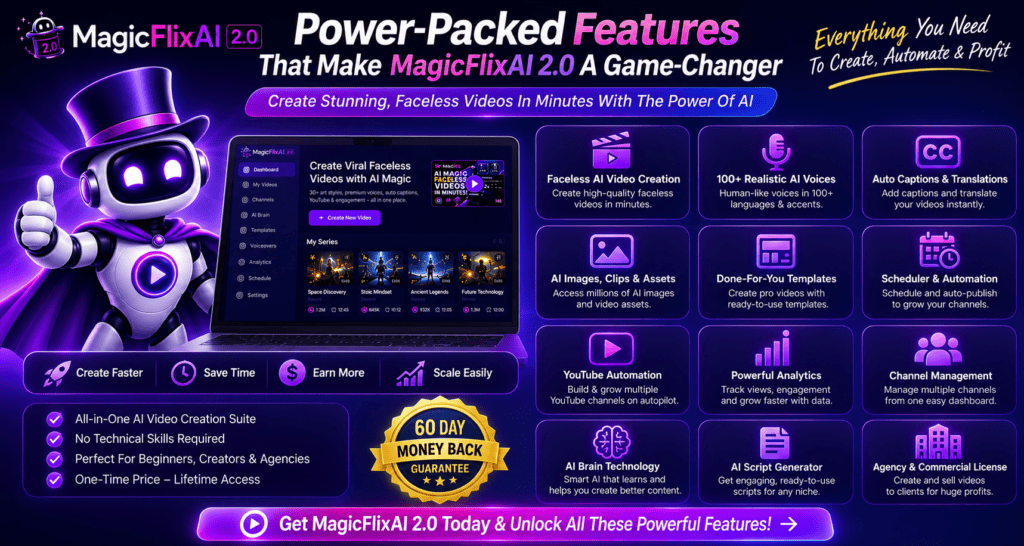
MagicFlixAI 2.0 is built around a simple idea: instead of using separate tools for scripts, voiceovers, visuals, editing, thumbnails, keyword research, scheduling, and channel management, bring as much of that workflow as possible into one platform.
That is what makes the software different from a basic AI video generator.
A standard AI video tool usually helps you create one video. MagicFlixAI 2.0 goes further by helping users build and operate complete faceless channels around a niche, brand, product, service, or business.
Below is a closer look at the main MagicFlixAI 2.0 features and what they actually mean in practical use.
MagicFlixAI 2.0 Features at a Glance
| Feature | What It Does |
|---|---|
| AI Channel Brain | Builds a consistent channel identity and content direction |
| Faceless Video Creation | Creates videos without appearing on camera |
| AI Voiceovers | Generates narration for video content |
| Multiple Video Styles | Supports different niches and content formats |
| Timeline Editor | Lets users manually adjust scenes and video elements |
| Automatic Subtitles | Generates synchronized captions |
| Viral Idea Research | Helps uncover potential content topics |
| Keyword Research | Finds keyword opportunities for videos |
| AI Titles & Descriptions | Creates optimized video metadata |
| Hashtag Research | Suggests relevant hashtags |
| AI Thumbnails | Generates thumbnail concepts |
| Scheduling | Organizes and schedules future videos |
| Agency Tools | Supports client-based video services |
| Affiliate Monetization | Helps build promotional and review-style content |
AI Channel Brain
One of the most important MagicFlixAI 2.0 features is the AI Channel Brain.
Instead of treating every video as a completely separate project, the Channel Brain is designed to learn the direction of your channel.
You can build the channel around information such as:
- A niche
- Business
- Website
- Product
- Service
- Affiliate offer
- Brand style
- Intended audience
The aim is to make future content more consistent.
For example, imagine you are building a channel around home fitness. You probably do not want one video sounding highly technical and the next sounding like children’s entertainment.
The Channel Brain gives the system more context so the content can stay closer to a defined identity.
That is particularly useful for anyone planning to publish regularly.
AI Faceless Video Creation
Faceless content creation is at the center of MagicFlixAI 2.0.
Users do not necessarily need to:
- Appear on camera
- Record their own voice
- Film original footage
- Manually assemble every video scene
The AI can help combine scripts, narration, visuals, clips, captions, music, and other elements into finished video content.
This makes the platform suitable for people who want to create YouTube channels, Shorts, promotional videos, educational content, or other video formats without becoming the on-screen personality.
Want to Explore the Core Video Tools?
→ Check the Current MagicFlixAI 2.0 Offer
Multiple Channel and Video Styles
MagicFlixAI 2.0 is not limited to a single type of video.
The platform is designed to support multiple content styles, including formats such as:
- Educational videos
- Documentary-style content
- Trivia
- Historical recreations
- Story videos
- POV-style videos
- AI ASMR
- Affiliate content
- Product-focused videos
- Local business videos
- Short-form social content
This flexibility matters because different audiences respond to different formats.
A local dentist probably needs a very different channel from someone creating mystery stories or software reviews.
AI Voiceover Technology
MagicFlixAI 2.0 includes AI narration capabilities.
Instead of recording every script manually, users can generate voiceovers that match the content.
That can save time, especially when producing videos frequently.
However, here’s what most people don’t know: voice selection can have a major effect on how professional a video feels.
A good script delivered with flat or unnatural narration can quickly lose viewer attention.
For users who need more advanced narration options, the MagicFlixAI funnel also offers additional voice technology through the Voicely upgrade.
Multi-Track Video Editor
Automation is useful, but sometimes you need control.
MagicFlixAI 2.0 includes a timeline-style editing environment that allows users to modify generated videos before publishing.
You can work with elements such as:
- Scenes
- Video clips
- Images
- Narration
- Music
- Timing
- Transitions
- Effects
This is important because AI-generated videos should still be reviewed.
The biggest mistake people make is publishing the first version simply because the software produced it automatically.
Editing gives you the opportunity to improve pacing, correct mistakes, remove weak scenes, or strengthen the final call to action.
Automatic Subtitles
MagicFlixAI can generate synchronized subtitles automatically.
This is particularly useful for short-form content.
Many people watch videos with the sound turned off, especially when scrolling through social platforms. Captions allow the message to remain understandable even without audio.
Subtitles can also make content easier to follow for a wider audience.
Viral Content Idea Research
Creating videos quickly is not much help if you do not know what to create.
MagicFlixAI 2.0 includes research tools designed to help users discover potential video ideas.
Ideas can be developed around:
- Keywords
- Niches
- Competitors
- URLs
- Existing topics
The system can help identify different types of opportunities, including trending, viral, and evergreen concepts.
This does not guarantee that a topic will become viral.
It simply gives creators more data and ideas before deciding what to produce.
Keyword Research and Video SEO
MagicFlixAI also includes keyword research functionality.
For people building YouTube channels, this can help identify topics that viewers may already be searching for.
The software can assist with:
- Keyword discovery
- Video topics
- Titles
- Descriptions
- Hashtags
- Content optimization
In simple terms, the platform tries to connect video creation with discoverability.
That is a useful combination because creating a polished video around a topic nobody searches for can still result in very little traffic.
AI Title and Description Generation
MagicFlixAI 2.0 can generate titles and descriptions based on your video topic.
This can speed up publishing, but AI-generated metadata should still be reviewed.
A title needs to do two jobs:
- Explain what the video is about.
- Give the viewer a reason to click.
Keyword stuffing usually makes titles less appealing, not more effective.
The best approach is to use AI suggestions as a starting point and then refine them for humans.
Hashtag Research
The platform can also suggest relevant hashtags.
This is more useful for certain social platforms than others, but having hashtag research inside the same workflow helps reduce the number of separate tools needed during publishing.
AI Thumbnail Creation
MagicFlixAI 2.0 includes AI thumbnail-generation tools.
For YouTube creators, this may be one of the more practical features.
A strong video with a weak thumbnail can struggle to attract clicks.
The platform can help generate visual concepts around the topic, although you should still check:
- Text readability
- Visual clarity
- Mobile appearance
- Relevance to the actual video
- Whether the thumbnail looks overly artificial
A thumbnail should attract attention without misleading the viewer.
Want the Full MagicFlixAI Toolset?
→ View MagicFlixAI 2.0
Scheduling and Content Calendar
MagicFlixAI includes scheduling and content-management features.
Instead of creating a video and immediately wondering what comes next, users can plan a future publishing pipeline.
For example:
Monday – educational video
Wednesday – short-form clip
Friday – product or affiliate content
This becomes increasingly useful when managing multiple channels or client accounts.
The real advantage is consistency.
Creating ten videos in one weekend is not necessarily better than publishing consistently for ten weeks.
Agency and Client Features
MagicFlixAI 2.0 is also designed for freelancers and agencies.
Additional upgrades expand agency capabilities with features such as:
- Client accounts
- Commercial usage
- Branding controls
- White-label options
- Team access
- Custom domains
- Agency sales resources
These features matter more if you plan to sell video creation or channel-management services.
A solo creator may never need them.
That is why it is better to evaluate upgrades based on your actual business model rather than simply choosing the plan with the longest feature list.
Affiliate and Business Content Creation
MagicFlixAI can also be used to build content around products, services, and affiliate offers.
For example, an affiliate marketer could create a channel around a software niche and produce:
- Tutorials
- Comparisons
- Educational videos
- Product explanations
- Review-style content
- Problem-solving videos
That does not mean the software automatically generates commissions.
The video still needs genuine value, strong positioning, and an audience that is interested in the offer.
MagicFlixAI helps with production. Marketing strategy still matters.
Which MagicFlixAI 2.0 Features Matter Most?
For most users, I would focus on five areas first:
1. AI Channel Brain – for consistency.
2. Faceless video creation – for faster production.
3. Manual editing – for quality control.
4. Research and SEO tools – for finding better topics.
5. Scheduling – for maintaining a consistent publishing workflow.
The agency, white-label, AR, and advanced voice tools are more specialized.
They can be valuable, but not everyone needs them.
Final Thoughts on MagicFlixAI 2.0 Features
The strongest thing about MagicFlixAI 2.0 is not one individual feature.
It is the way multiple pieces of the video workflow are brought together.
You can potentially research a topic, develop a channel identity, generate content, add narration, edit the result, optimize it, create a thumbnail, and schedule publication without constantly moving between different platforms.
That is where the software has the most practical appeal.
For occasional video creators, that may be more functionality than necessary.
For people planning to publish regularly, manage several channels, promote affiliate products, or provide video services to clients, the combined workflow can be far more useful.
The software can handle much of the production process.
Your job is still to make sure the content is accurate, relevant, useful, and worth watching.